
2025 update -> https://github.com/cinight/PSBlendModes
Note: this page only contains workaround for Builtin-RP and URP in 2019.3 LTS version. Go to above link if you need better explanations and workaround codes for URP in 2022.3 LTS and U6.
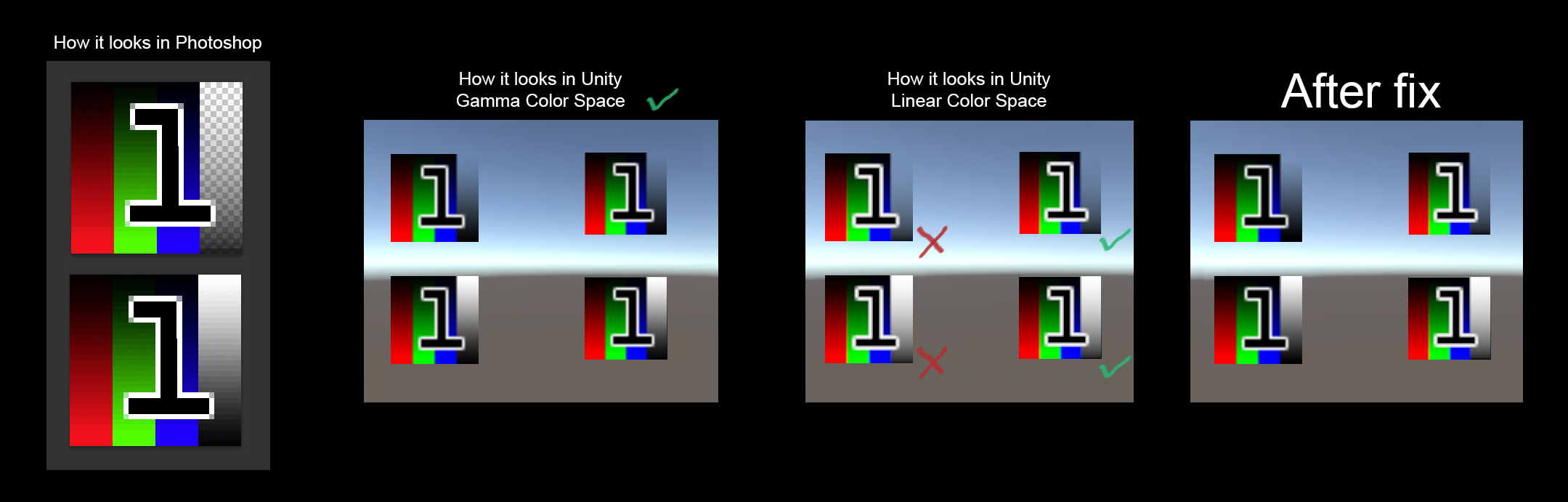
Having this problem?
https://forum.unity.com/threads/gamma-colors-for-ui-and-linear-for-scene.529923/

Looking for a way to make only the UI matches to what is designed in Photoshop? Don’t want artists to change any workflow(possible solution for artists please refer to this comment) because you are in the middle of development? Try this.
Workaround Approach:
The approach is to do the gamma <-> linear conversion in an image effect shader. We let the UI contents to blend in Linear, and then convert the result back to Gamma again.
To solve it in Builtin Render Pipeline:
Download: https://drive.google.com/open?id=1m-Bi-nbsZWr4oh52Phmz0iTGz0WGH0sK
The project contains the shader and scripts.
Then mind these settings when you apply the tool to your project:
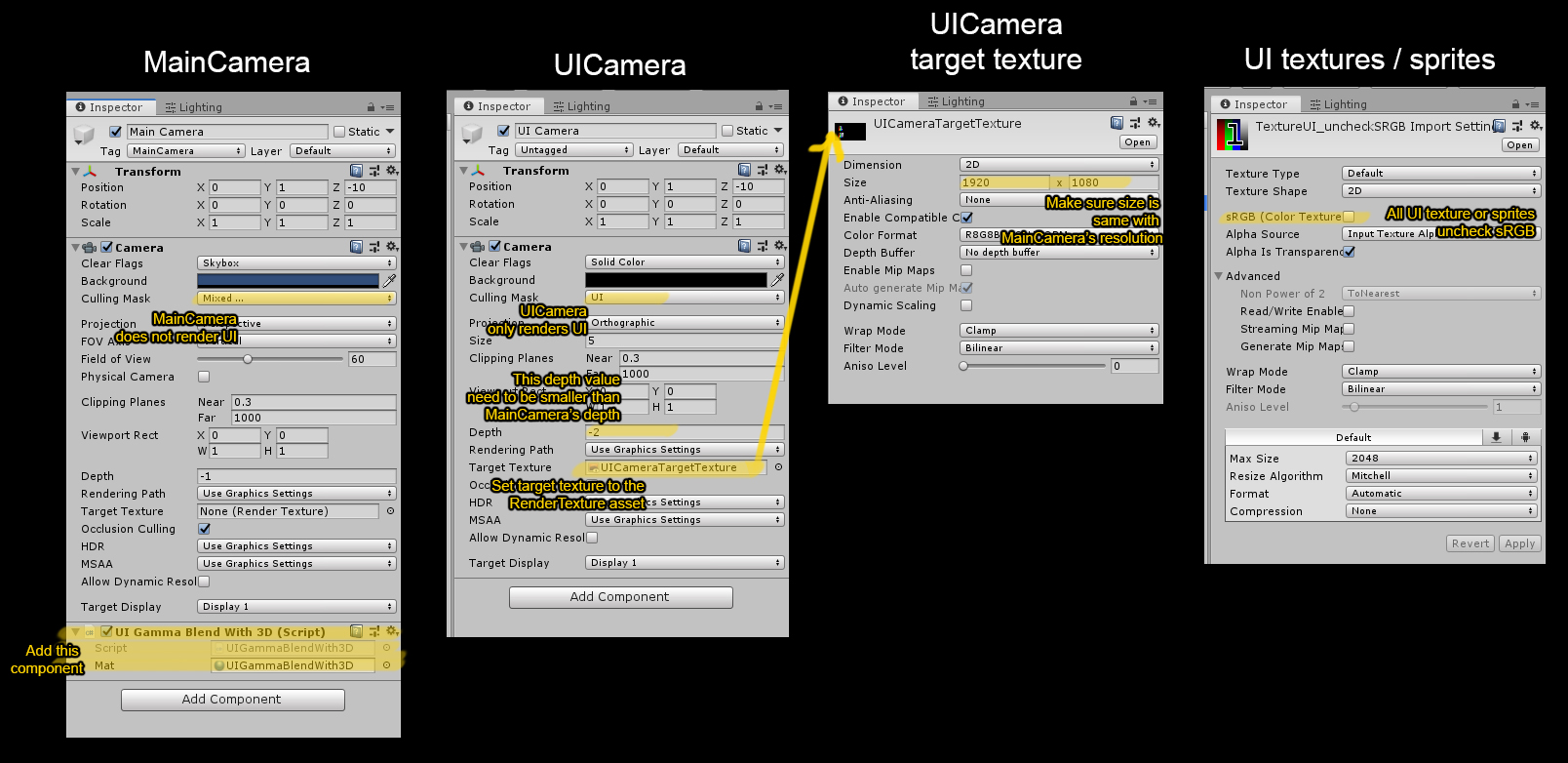
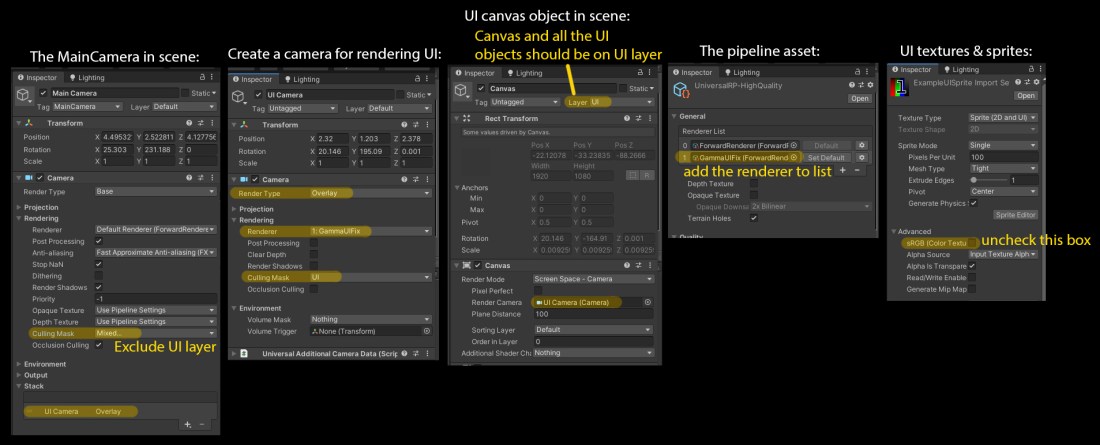
To solve it in Universal Render Pipeline (7.2.0+), in Unity 2019.3 version:
Download: https://drive.google.com/open?id=1mZXO2rYTCml86miJlhna1cm5QJ1i60ww
The project contain GammaUIFix assets. These are what you need to include into your own project. And then apply following settings in your own project:
Drawback – There is no free lunch:
There might be small performance impact as this is a Graphics blit of full screen image effect.
 Ming Wai Chan
Hello there, love your solution to this annoying issue. Is there any chance you can update the fix for Unity 2022.3 and URP 14.0? I tried myself yesterday but just can’t get it to work and got my PC to crash with memory issues 🙂 Appreciate it!
LikeLike
Hello, I’ve updated the workaround code!
2022.3 code is here: https://github.com/cinight/PSBlendModes/tree/2022.3
there is also U6 version if you need (checkout to 6000.0 branch)
LikeLike
Thx for updated project, but if you reduce
Application.targetFrameRate to 60
then the image starts to blink, you can see the switching of buffers
LikeLike
I can’t reproduce it. Does it happen on specific platform? But anyway I’ve added a Use Swap Buffer checkbox on the workaround component, try to disable it to see if it helps.
LikeLike
Just add in CameraColorSpaceWorkaround
private void Awake()
{
Application.targetFrameRate = 120;
}
https://fex.net/ru/s/aedd8sz
LikeLike