
Scenario: An environment with many objects with different materials that need fog but there is some special ShaderGraph material objects that do not need fog.
Hack for Editor:
- Of course you have enabled Fog in LightingSettings
- Create a ShaderGraph and add these 3 FOG keywords
- Make sure the Reference are exactly “FOG_LINEAR“, “FOG_EXP” and “FOG_EXP2“
- Create a material and use this ShaderGraph
- I’m using Exponential Squared fog in Lighting Settings so I turn off “FOG_EXP” and “FOG_EXP2”, but leaving “FOG_LINEAR” checked does the trick

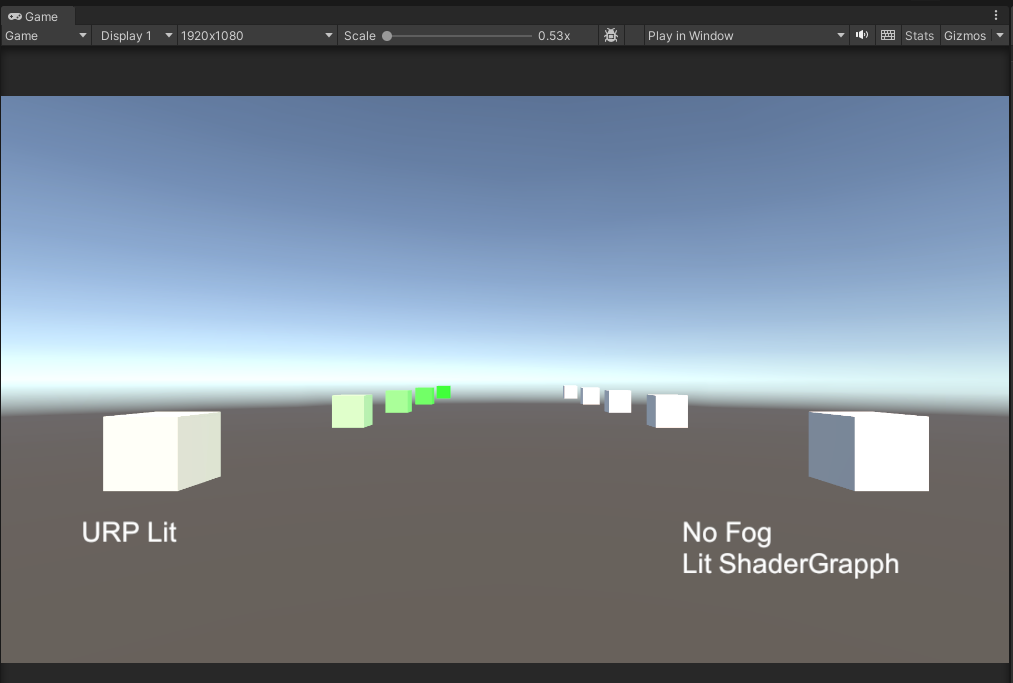
Hack for Player:
- Create a shader variant stripping script
- Put it in Editor folder
- Make a player build
using System.Collections.Generic;
using UnityEditor.Build;
using UnityEditor.Rendering;
using UnityEngine;
using UnityEngine.Rendering;

class StrippingExample_Shader : IPreprocessShaders
{
    public StrippingExample_Shader()
    {

    }

    public int callbackOrder { get { return 99; } }

    public void OnProcessShader(Shader shader, ShaderSnippetData snippet, IList<ShaderCompilerData> data)
    {
        for (int i = 0; i < data.Count; ++i)
        {
            //Get a string of keywords
            string variantText = "";
            foreach(ShaderKeyword s in data[i].shaderKeywordSet.GetShaderKeywords())
            {
                variantText += " " +s.name;
            }

            bool wantToStrip = false;

            //Only stripping the shader graph that we don't want fog
            if(
                shader.name == "Shader Graphs/ShaderGraphNoFog" &&
                variantText.Contains("FOG_")
            )
            {
                wantToStrip = true;
            }

            if ( wantToStrip )
            {
                //Strip the variant
                data.RemoveAt(i);
                --i;
            }
        }
    }
}


Get the test project here if you need (Open with Unity 2022.2)



 Ming Wai Chan